
Overview
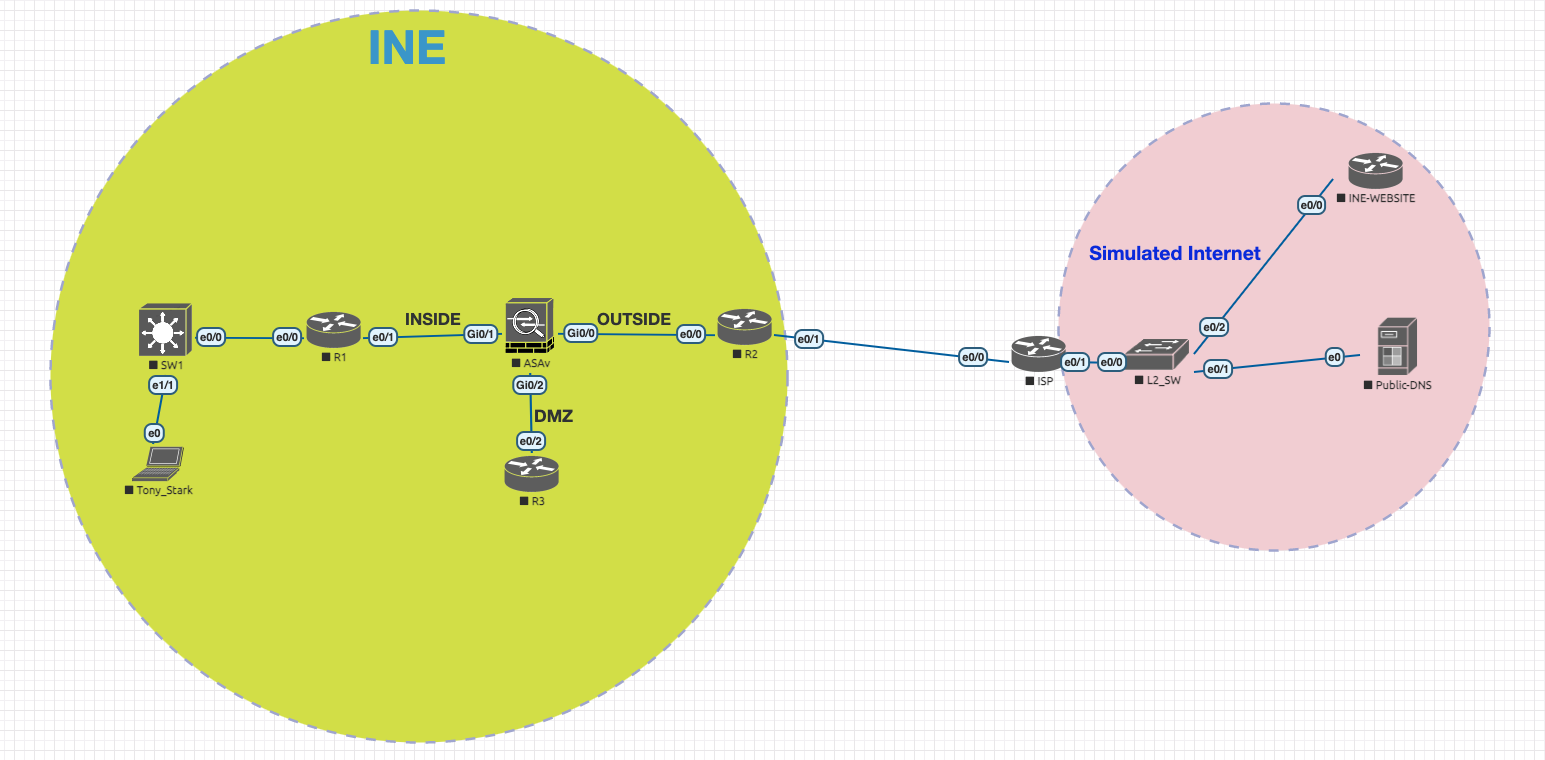
Task: Section 1 - ASA NAT and PAT
BEFORE STARTING SECTION 1, POWER ON ALL DEVICES. Some devices may take longer to power on as they have been set with a delay timer. The enable password for ASA is "cciesecurity". The username/password to INE.com is "cisco/cisco". All Windows PC's have the username set as "administrator" and password set as "C1sc0123!". All router passwords are set to "cisco" You DO NOT have access to the ISP router.
All devices have been pre-configured with hostnames and IPv4 addressing. As an network security engineer for INE, you have been assigned the following tasks to be completed in 2 hours:
-
Configure Dynamic NAT and PAT as per the following requirements:
- All hosts behind the inside interface of ASA, have their addresses PAT translated using the outside IP address of the ASA. This rule must appear in Section 2 when you use the "show nat" command.
- Configure NAT such that hosts on the inside network 10.0.0.0/24 going to any destination on the outside, have their addresses dynamically translated into an address pool ranging from 120.0.0.102 - 120.0.0.103. If the pool gets exhausted, then they should be dynamically PAT translated using the outside IP address of the ASA.
- Create a new Loopback 0 interface (10.1.1.0/24) on R1. Configure NAT such that hosts on the inside network 10.1.1.0/24 going to any destination on the outside, have their addresses dynamically translated into an address pool ranging from 120.0.0.202 - 120.0.0.203. If the pool gets exhausted, then they should be dynamically PAT translated using the IP address 120.0.0.204.
- For all these requirements, you must configure NAT globally, which must appear in Section 1 when you use the "show nat" command unless stated otherwise.
- All inside networks must be able to access www.ine.com on port 80/443.
-
Configure Dynamic Policy NAT and PAT as per the following requirements:
- Configure NAT such that hosts on the inside network 10.0.0.0/24 going to www.101.ine.com on the outside, have their addresses dynamically translated into an address pool ranging from 120.0.0.110 - 120.0.0.111. If the pool gets exhausted, then they should be dynamically PAT translated using the outside IP address of the ASA.
- Configure NAT such that hosts on the inside network 10.0.0.0/24 going to www.102.ine.com on the outside, have their addresses dynamically translated into an address pool ranging from 120.0.0.212 - 120.0.0.214. If the pool gets exhausted, then they should be dynamically PAT translated using the IP address 120.0.0.215.
- TELNET from inside subnet 10.0.0.0/24 to www.103.ine.com should be dynamically translated into an address pool ranging from 120.0.0.130 - 120.0.0.131. If the pool gets exhausted, then they should be dynamically PAT translated using the outside IP address of the ASA.
- For all these requirements, you must configure NAT globally, which must appear in Section 1 when you use the "show NAT" command.
-
Configure Static NAT, Static Policy NAT, Static PAT and Twice NAT as per the following requirements:
- Configure static bi-directional NAT on the ASA in such a way that host 10.0.0.254 and 172.16.1.3 (R3) get mapped to 120.0.0.254 and 120.0.0.3 respectiviely. Ensure that R2 synchronizes clock from the NTP server 10.0.0.254. You are allowed to create an ACL to achieve this requirement. Use must use Manual NAT to achieve this requirement.
- Configure static PAT on the ASA in such a way that if the subnet 10.0.0.0/24 does TELNET to www.104.ine.com, it gets translated using outside IP address 120.0.0.199.
- Configure static NAT on the ASA in such a way that TELNET sessions to the outside interface are redirected to R1’s Loopback 0 interface. Use Manual NAT to achieve this.
- Configure the ASA in such a way that TELNET sessions to the outside interface on port 2323, are redirected to 10.0.0.254. Use Manual NAT to achieve this.
- Ensure 10.0.0.100 is statically translated to 120.0.0.100 and www.105.ine.com is statically translated to 10.0.0.105. Ensure both, Tony Stark and www.105.ine.com can access each other using their translated address.
Solutions:
View the Solution Videos accompanying these tasks for a complete walkthrough.
Here is the NAT configs I have configured on the ASA. However, you must watch the video solution for other configs that I have applied on the routers.
object network Obj-10.0.0.0-24
         subnet 10.0.0.0 255.255.255.0
        !
        object network Obj-120.0.0.102-103
         range 120.0.0.102 120.0.0.103
        !
        object network Obj-10.1.1.0-24
         subnet 10.1.1.0 255.255.255.0
        !
        object network Obj-120.0.0.202-203
         range 120.0.0.202 120.0.0.203
        !
        object network Obj-120.0.0.204
         host 120.0.0.204
        !
        object network Obj-120.0.0.110-111
         range 120.0.0.110 120.0.0.111
        !
        object network Obj-www.101.ine.com
         host 200.200.200.101
        !
        object network Obj-120.0.0.212-214
         range 120.0.0.212 120.0.0.214
        !
        object network Obj-120.0.0.215
         host 120.0.0.215
        !
        object network Obj-www.102.ine.com
         host 200.200.200.102
        !
        object network Obj-120.0.0.130-131
         range 120.0.0.130 120.0.0.131
        !
        object network Obj-www.103.ine.com
         host 200.200.200.103
        !
        object network Obj-10.0.0.254
         host 10.0.0.254
        !
        object network Obj-172.16.1.3
          host 172.16.1.3
        !
        object network Obj-120.0.0.254
          host 120.0.0.254
        !
        object network Obj-120.0.0.3
          host 120.0.0.3
        !
        object network Obj-www.104.ine.com
          host 200.200.200.104
        !
        object network Obj-120.0.0.199
          host 120.0.0.199
        !
        object network Obj-10.1.1.1
          host 10.1.1.1
        !
        object network Obj-10.0.0.100
          host 10.0.0.100
        !
        object network Obj-120.0.0.100
          host 120.0.0.100
        !
        object network Obj-www.105.ine.com
          host 200.200.200.105
        !
        object network Obj-10.0.0.105
          host 10.0.0.105
        !
        object-group network Obj-grp-nat-pat-10.1.1.0
         network-object object Obj-120.0.0.202-203
         network-object object Obj-120.0.0.204
        !
        object-group network Obj-grp-120.0.0.212-215
         network-object object Obj-120.0.0.212-214
         network-object object Obj-120.0.0.215
        !
        nat (inside,outside) source static Obj-10.0.0.100 Obj-120.0.0.100 destination static Obj-10.0.0.105 Objwww.105.ine.com
        !
        nat (inside,outside) source static Obj-10.0.0.254 interface service Obj-S-23 Obj-S-2323
        !
        nat (inside,outside) source static Obj-10.1.1.1 interface service Obj-S-23 Obj-S-23
        !
        nat (inside,outside) source static Obj-10.0.0.254 Obj-120.0.0.254
        !
        nat (inside,outside) source dynamic Obj-10.0.0.0-24 Obj-120.0.0.110-111 interface destination static Obj-www.101.ine.com Obj-www.101.ine.com
        !
        nat (inside,outside) source dynamic Obj-10.0.0.0-24 Obj-grp-120.0.0.212-215 destination static Obj-www.102.ine.com Obj-www.102.ine.com
        !
        nat (inside,outside) source dynamic Obj-10.0.0.0-24 Obj-120.0.0.130-131 interface destination static Obj-www.103.ine.com Obj-www.103.ine.com service Obj-D-23 Obj-D-23
        !
        nat (inside,outside) source static Obj-10.0.0.0-24 Obj-120.0.0.199 destination static Obj-www.104.ine.com Obj-www.104.ine.com service Obj-D-23 Obj-D-23
        !
        nat (inside,outside) source dynamic Obj-10.0.0.0-24 Obj-120.0.0.102-103 interface
        !
        nat (inside,outside) source dynamic Obj-10.1.1.0-24 Obj-grp-nat-pat-10.1.1.0
        !
        nat (dmz,outside) source static Obj-172.16.1.3 Obj-120.0.0.3
        !
        nat (inside,outside) after-auto source dynamic any interface